


Concrete Pumping
From boom pumping to telebelts, we help concrete placement teams deliver best-in-class service with every job.
/TEST%20icons/noun-concrete-pump-5976240.svg)
/Industry%20Icons/noun-5917380.svg)
/Industry%20Icons/noun-truck-4140346.png?width=60&name=noun-truck-4140346.png)


/TEST%20icons/noun-crane-truck-6830557.svg)
/TEST%20icons/noun-drilling-5103943.svg)


/Industry%20Icons/noun-road-fence-3990160.png?width=60&name=noun-road-fence-3990160.png)

/No%20Background/noun-maintenance-7409171-F1612C.png?width=60&name=noun-maintenance-7409171-F1612C.png)


Quick answer
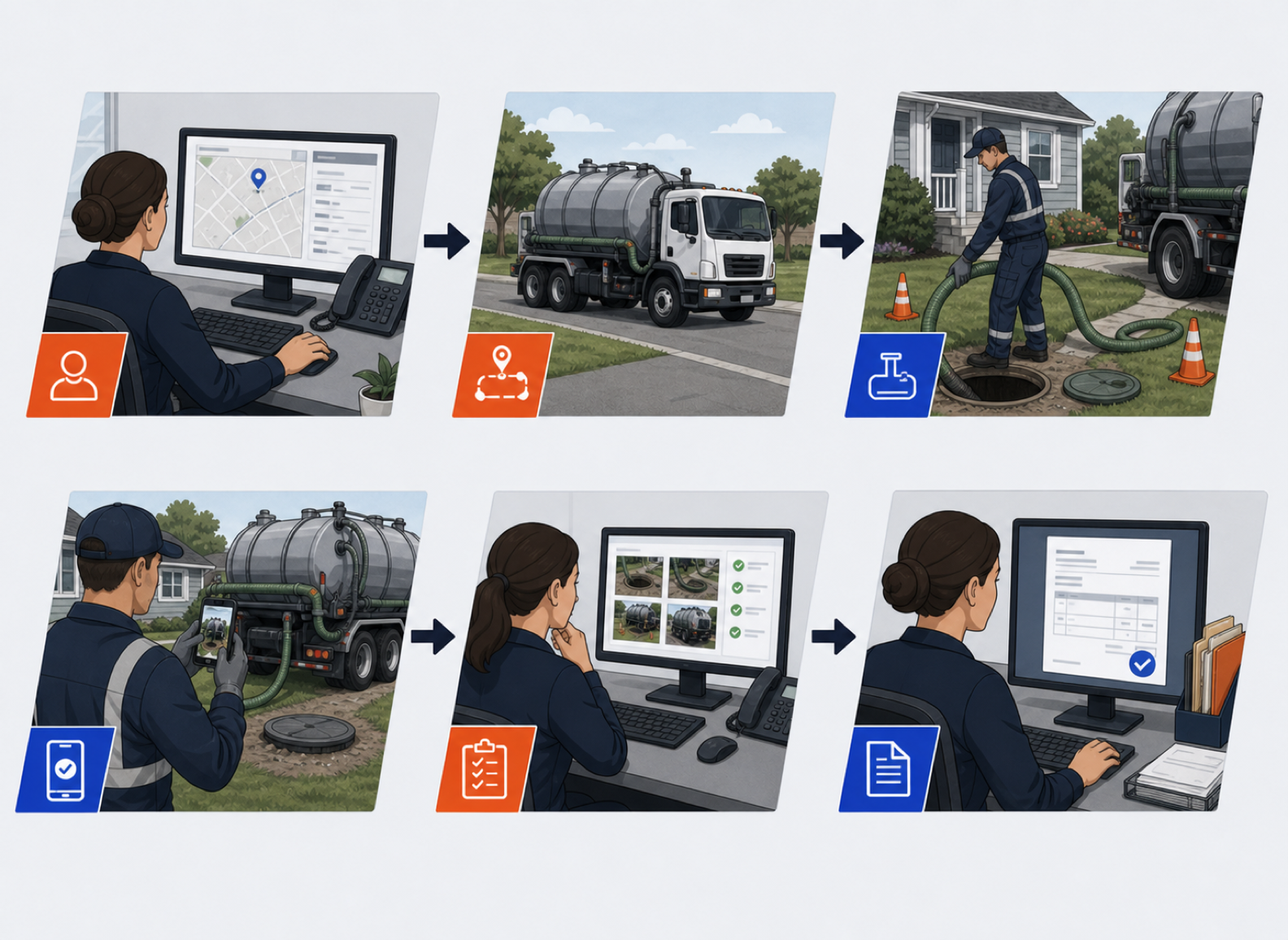
Tracking a septic or liquid waste job from pump-out to invoice comes down to five steps: dispatch the job with the right service details, capture proof of service in the field, record any add-on charges on the spot, sync the completed job to accounting automatically, and reconcile recurring accounts on a schedule. The operators who lose money on this workflow are almost always losing it between step two and step four, when a completed pump-out sits on a paper ticket for days before anyone bills it. Full workflow below.
| Step | What happens | Captured by |
|---|---|---|
| 1 | Dispatch the job with property, access, and interval details | Dispatcher, on the dispatch board |
| 2 | Capture proof of service: photos and signature | Driver, in the field app |
| 3 | Record add-on charges at the point of service | Driver, on the same ticket |
| 4 | Sync the completed job to QuickBooks automatically | System, no re-entry |
| 5 | Reconcile recurring accounts on a weekly schedule | Office staff, standing schedule |
Before a driver leaves the yard, the dispatch record should carry the property address, tank size or system type if known, access notes, and whether the stop is a one-time pump-out or part of a recurring service interval. Recurring accounts, in particular, need their next-due date visible on the dispatch board rather than tracked separately in a spreadsheet, since that is where scheduled service intervals get missed.
A septic driver completing a pump-out should be able to add a line item for anything found on site, such as a clogged access point or an unusual tank condition, take a photo, and capture the customer's signature before leaving the property. This is the point where a driver app crews will actually use matters more than a feature list: if the app is slow or confusing in the field, drivers revert to a paper ticket, and the whole workflow behind it breaks down.
Additional charges, an extra tank, a longer hose run, an access point repair, need to be recorded on the same ticket while the driver is still on site. Waiting until end of day to reconstruct add-on charges from memory is where operators lose the most billable revenue on liquid waste routes.
Once the driver marks a job complete with photos, signature, and any add-on charges attached, that job should flow into billing without anyone re-typing it into accounting software. CRO's field-to-invoice workflow captures every line item, service photo, and signature in the driver app, then syncs the completed job to QuickBooks Online or QuickBooks Desktop automatically, so billing runs through the accounting system operators already use, without the manual double entry.
Recurring septic and liquid waste accounts need a standing schedule that generates the next service call and invoice automatically, rather than relying on a dispatcher to remember which properties are due this month. Running this reconciliation weekly, rather than at the end of the billing cycle, is what keeps days-to-invoice short on recurring accounts.
Septic and liquid waste demand is not flat through the year. Event season, storm cleanup, and municipal contract cycles can push a normal week of pump-outs into several days of back-to-back stops. The five-step workflow above matters most under exactly this kind of pressure, because it is when a dispatcher is most likely to skip a step to save time. A driver who skips photo capture during a surge week creates a billing dispute weeks later when nobody remembers the details. Keeping the same steps in place during a surge, rather than relaxing them, is what keeps a busy month from becoming a slow billing quarter.
A single truck and driver can hold this workflow together with a notebook if it has to. It falls apart as soon as a second or third technician is on the road at the same time. Without a shared dispatch board, two drivers can end up at the same property, or a recurring account gets skipped because neither driver realized it was assigned. Without a shared record of add-on charges, an office team billing at the end of the week has no way to check a driver's memory against what actually happened on site.
The fix is not more supervision. It is making the dispatch board, the driver app, and the billing system the same shared record, so a completed job is visible to everyone the moment it closes rather than after someone re-enters it. Operators scaling from one truck to a small fleet consistently find this is the point where a shared system stops being a nice-to-have and starts being the only way dispatch and billing stay accurate.
Before moving a septic or liquid waste operation onto a new platform, confirm three things: that recurring account intervals migrate over with their next-due dates intact, that historical job records and photos stay accessible for warranty or dispute purposes, and that the QuickBooks connection maps existing customers and items correctly rather than creating duplicates. Getting these three right during setup avoids the most common cause of a rocky first billing cycle after a switch.
This is the same field-to-invoice pattern that drives billing for portable sanitation and roll-off accounts. See how it compares directly against a specialist portable sanitation platform in CRO vs ServiceCore, or against the field's broader options in Best Waste Management Software in 2026.
Schedule a demo with one of our septic and liquid waste experts today!
The workflow has five steps: dispatch the job with full service details, capture proof of service including photos and a signature in the field, record any add-on charges at the point of service, sync the completed job to QuickBooks automatically, and reconcile recurring accounts on a standing schedule.
Most disputes come from add-on charges that were not documented at the point of service, or from a completed job that was re-entered into accounting software days later with details missing. Photo and signature capture at the time of service is the biggest reducer of these disputes.
Yes. CRO captures every line item, service photo, and signature in the driver app, then syncs the completed job to QuickBooks Online or QuickBooks Desktop without manual re-entry.
Recurring accounts need a standing schedule that generates the next service call and invoice automatically, checked on a weekly cadence, rather than relying on a dispatcher to track which properties are due.
The property address, tank size or system type if known, access notes, and whether the stop is a one-time pump-out or part of a recurring service interval, with the next-due date visible on the dispatch board for recurring accounts.
