


Concrete Pumping
From boom pumping to telebelts, we help concrete placement teams deliver best-in-class service with every job.
/TEST%20icons/noun-concrete-pump-5976240.svg)
/Industry%20Icons/noun-5917380.svg)
/Industry%20Icons/noun-truck-4140346.png?width=60&name=noun-truck-4140346.png)


/TEST%20icons/noun-crane-truck-6830557.svg)
/TEST%20icons/noun-drilling-5103943.svg)


/Industry%20Icons/noun-road-fence-3990160.png?width=60&name=noun-road-fence-3990160.png)

/No%20Background/noun-maintenance-7409171-F1612C.png?width=60&name=noun-maintenance-7409171-F1612C.png)


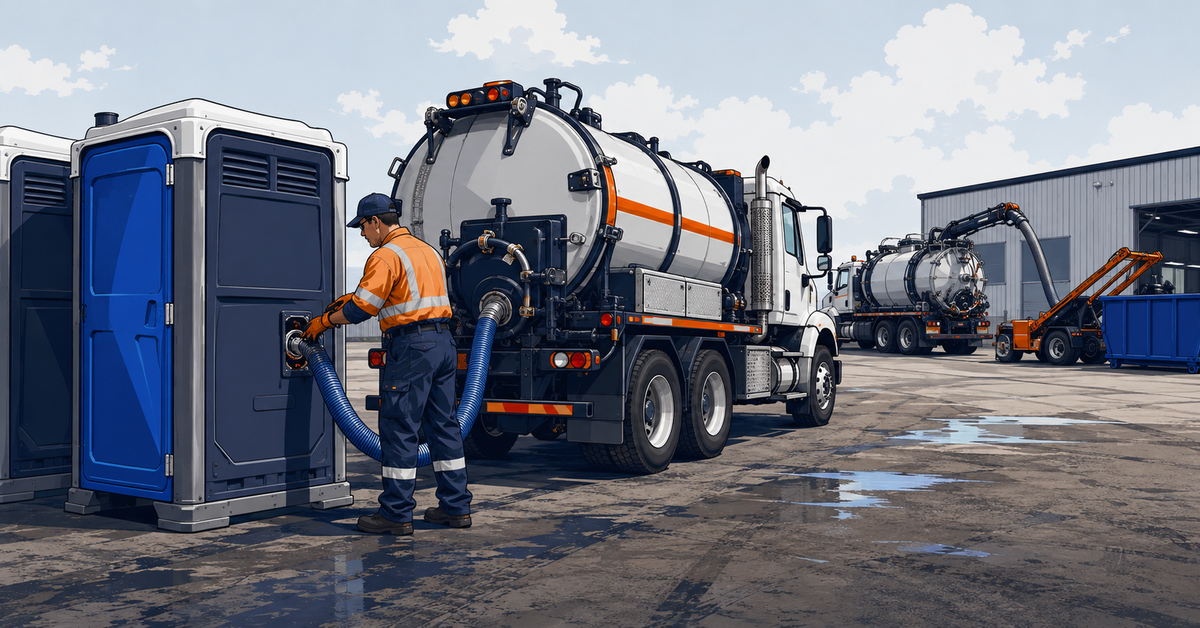
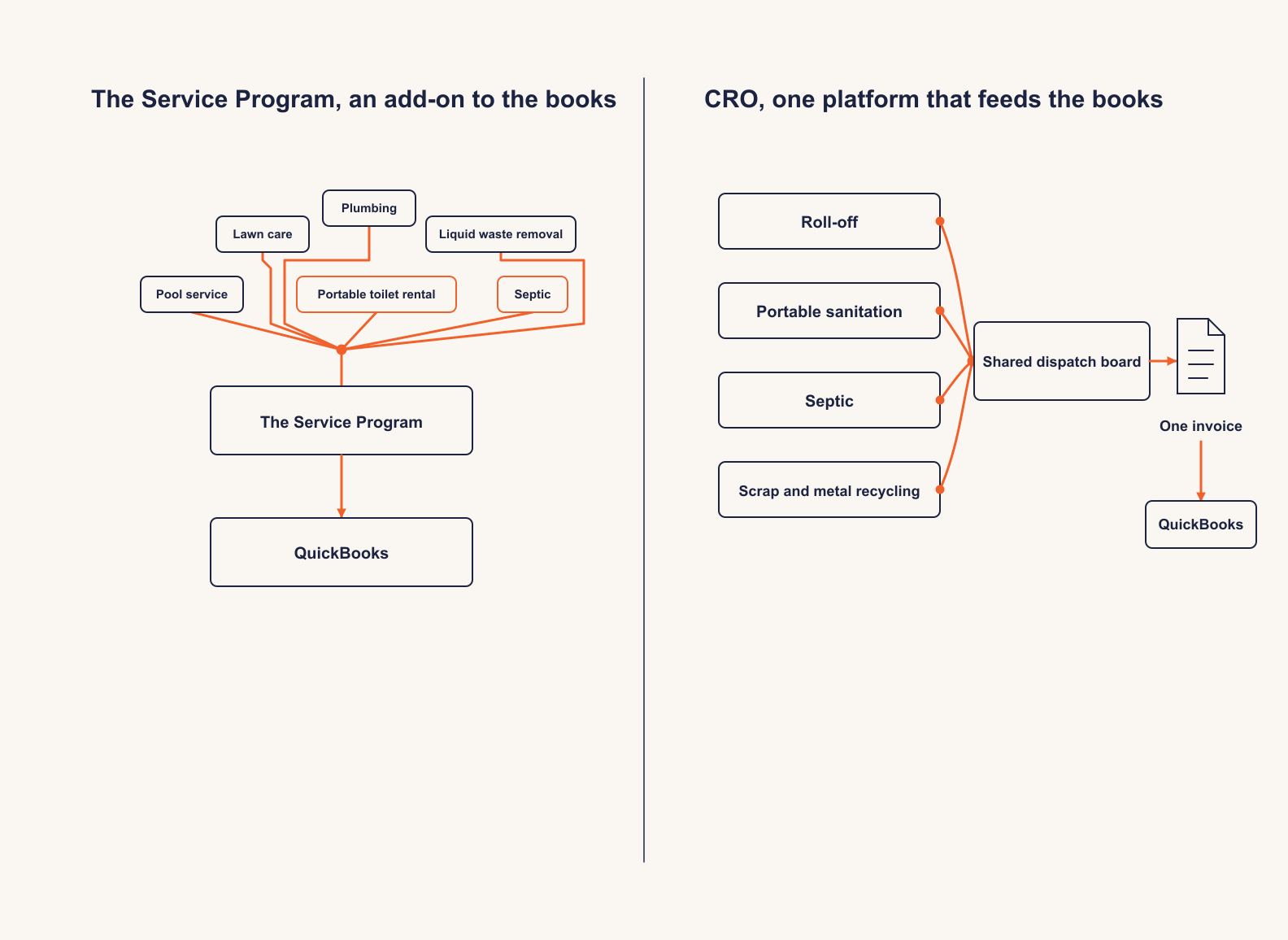
The Service Program and CRO Software solve the same daily problem, getting a route, a driver and an invoice to agree with each other. They solve it from opposite directions. One extends the books you already keep in QuickBooks. The other runs the operation and hands the books what they need.
Which one fits depends less on features than on how many service lines you run and where you want the operational record to live. Every claim below cites the exact vendor page it comes from, and the section at the end names the operation where The Service Program is the better choice.
Quick answer
CRO is the stronger fit for a roll-off, portable sanitation, septic, or scrap and metal operator that wants dispatch, driver work, and billing connected in one system, especially once a second service line enters the picture. The Service Program is the stronger fit for a small, single-line portable toilet or septic pumping business that already runs QuickBooks and wants routing and work orders bolted onto the books it already keeps, at a published entry price.
We looked for solutions that connect dispatch, field work, and billing without a second system for reconciliation. Five criteria drove the comparison.
01Architecture
Standalone platform or an add-on layered onto an existing accounting system, and what that choice does to setup, sync, and daily workflow.
02Service-line scope
How many waste and site-service lines each platform actually serves, read from each vendor's own industry pages rather than a marketing headline.
03Field to invoice
Proof of service (photos, notes, signatures) and completed field work flowing into billing without office staff re-entering what a driver already recorded.
04Pricing transparency
Whether either vendor lists a real number publicly, and what a buyer actually pays once required add-ons are included.
05Independent review evidence
Review-platform ratings and volume for both products, rather than either vendor's own claims about satisfaction.
| Capability |  CRO CRO |  The Service Program The Service Program |
|---|---|---|
| Roll-off and dumpster dispatch | Yes | Nonot a listed service line |
| Driver app with proof of service | Yes | Partialcustomer-facing app; the field mobile solution is a paid add-on |
| QuickBooks connection | QuickBooks Online and Desktop | QuickBooks Desktop 2018+ and Online, built around it |
| Customer self-service portal | Yesincluded | Partiala paid add-on |
| Portable sanitation, septic, scrap in one system | Yes | Partialportable toilet and septic are separate industry pages |
| Public pricing published | Not published; quoted after a demo | Published, tiered by office user count |
| Container and asset aging reports | Yes | Nonot the product's focus |
| Published review rating | 4.3 out of 5, stated by CRO across review sites | 4.6 out of 5 (GetApp, 59 reviews) |
The table shows a fit decision, not a feature-count contest. The Service Program leads on price transparency and QuickBooks-native billing for a single-line shop. CRO leads on service-line breadth, container-level tracking, and a driver app whose proof of service capture the product page documents in detail.
Best for
A roll-off, portable sanitation, septic, or scrap and metal operator running, or planning to run, more than one service line.
Pricing
A flat monthly base fee plus a per-truck fee, quoted after a demo.
What it is. CRO by RapidWorks connects dispatch, field work, billing, and collections for asset-centric waste and site-service operators. It runs across roll-off, with additional support for portable sanitation, septic, and scrap and metal recycling, on one platform.
Where it wins. Routing, and unified dumpster plus route dispatch, are consistently rated top of the industry: a drag-and-drop board unifies container-level jobs and route-level assignments on one screen. CRO states a 4.3 out of 5 rating across independent software review sites [2]. The driver app captures "Photos, notes, and customer signatures captured on-site and attached to the job record" [2]. CRO users can set up their customers with their own online booking portal, so they can continue to request services directly online: the portal lets customers "self-serve" for "swap requests, pickups, online payments, and service history" [2]. CRO's own product page states it "is part of RapidWorks, the leading software platform for heavy equipment and site service companies" [2].
Where to look closely. A single-truck, single-line operator with no plans to add a second service may find more platform than it needs. CRO does not list a specific price; a buyer has to book a demo to get one, which is real friction for an owner who wants a number in writing before that first call.
The verdict. The stronger fit for an operator that wants container-level visibility, more than one service line, and field-to-invoice billing without a second reconciliation step.
Best for
A small, single-line portable toilet or septic pumping business already committed to QuickBooks that wants routing and work orders without a second accounting system.
Pricing
Published. A tiered monthly subscription by office-user count plus a one-time onboarding fee, with mobile and customer-portal access sold as separate add-ons.
What it is. The Service Program is a QuickBooks Desktop and Online add-on from Westrom Software, built to post field invoices, work orders, and route data directly into the books an operator already keeps. The software directory Software Finder describes it as software "designed to streamline operations for service-based businesses" [10]. Westrom's own site lists it as built for pool service, lawn care, HVAC, plumbing, liquid waste removal, and portable toilet and restroom rental, among other general service industries [4].
Where it wins. The pricing is public and specific: one office user runs $99.95 a month plus a $349 onboarding fee, and the top published tier, ten office users, runs $344.95 a month plus a $1,349 onboarding fee [7]. The Mobile Solution add-on for field technicians runs $79.95 a month for up to 14 users, and the Customer Portal add-on runs $59.95 a month [7]. A buyer can build a real number before ever booking a demo, something neither CRO nor ServiceCore currently allows.
Where to look closely. Westrom's own About page names pool service, lawn care, landscaping, plumbing, HVAC, pest control, liquid waste removal, portable toilet rental, electrical, equipment rental, and property management [4]. Roll-off, dumpster, solid waste, and scrap and metal recycling are not on that list, and the site carries no dedicated industry page for any of them. Reviewers on GetApp rate the product 4.6 out of 5 across 59 reviews, but one reviewer, a CEO, described a slow mobile app, past dates and former employees still showing in it, and invoice line items posting to an unspecified site when synced from the field [9].
The verdict. The stronger fit for a small, single-line portable toilet or septic operation that is already QuickBooks-committed and wants a published, predictable price more than multi-line breadth.
This is where ServiceCore's own comparison gets CRO wrong, and it is worth showing exactly how.
ServiceCore's article says operators evaluating alternatives report "no automated recurring or 28-day invoicing, no customer portal or inventory-aware online booking, no proof-of-service driver app, and no all-in-one platform" for CRO [1]. CRO's product page, current as of September 2026, says otherwise. Recurring service billing and pre-billing exist for standing accounts. The Customer Portal, quoted above, is live, and its Self-Service Requests feature lets customers "request swaps, services, pickups, or new rentals via a portal with built-in guardrails to prevent duplicate requests" [2], which is exactly the inventory-aware booking ServiceCore says is missing. The driver app's proof-of-service capture, also quoted above, is live. Four separate claims, and CRO's own public page documents all four directly.
ServiceCore discloses its own method plainly: "We asked AI to survey what operators report across review sites and industry forums, then combined it with documented feedback from sales conversations" [1]. That is a reasonable way to build a first draft. It is not a substitute for checking the vendor's current product page before publishing a claim about what that vendor's software does and does not do.
None of this means The Service Program is weak on billing. Its whole premise is a clean QuickBooks sync, and reviewers back that up: one CFO described the monthly billing process as very easy specifically because of how directly the product posts into QuickBooks [9]. Both platforms have real billing questions worth asking in a demo. Only one of them was described inaccurately in a published comparison.
A dispatch board is only as good as what happens next: an app drivers will actually use, not one they fight every stop. CRO's app gives drivers their full day, drops, swaps, services, and pickups, in one view, captures photos, notes, and signatures at the stop, and lets a driver add fees or overages before the job closes, so nothing gets left off the invoice. The Service Program's mobile solution is priced as its own add-on, and it supports "GPS pinpoint the tech upon arrival and departure (requires mobile)" and picture capture at the stop [3], with QR-code equipment scanning for stop verification on the portable toilet and septic pages [5][6]. Ask both vendors to run the same real job end to end before comparing feature lists on paper.
Westrom Software describes itself as "a privately owned software development company with more than 15 years of successful business application development experience" [4], founded by CEO Bill Westrom, and it became available for QuickBooks Online users in June 2015 [11]. It is a genuinely broad platform: pool service, lawn care, landscaping, plumbing, HVAC, pest control, electrical, equipment rental, and property management sit on the same page as liquid waste removal and portable toilet rental [4]. Its own septic and portable toilet industry pages describe route scheduling, dump-location reporting, and QR-code equipment tracking built specifically for those two verticals [5][6]. Basestation, a competitor that ranks itself first in the same comparison, credits it with "strong field service workflows and operational visibility" for "service-heavy portable sanitation companies with complex daily schedules" [13]. The same comparison calls it a platform for dumpster rental, a claim Westrom does not make anywhere [13]. What the product does not have is a dedicated page, or apparent purpose-built support, for roll-off and dumpster rental or scrap and metal recycling, two of the lines CRO is built for. A single-line portable toilet or septic pumper is squarely in The Service Program's built-for list. A roll-off or scrap operation is not.
CRO by RapidWorks customers describe the same pattern: one system instead of several bolted together. Carter's Septic Tank Service and Portable Washrooms' Kayla C. said CRO "was easy to learn and to implement! I genuinely do not know how we operated before. It was a breath of fresh air to see how easy it was to navigate, and how well our crews took to it!" [2]. Hoffman Sanitation grew from 3,000 to 13,000 customers on CRO while cutting daily billing time by more than 90 percent, running trash, roll-offs, portables, and septic pumping in one system [2].
Give both vendors the identical test in a live demo.
Choose The Service Program if
If the alternative you are really weighing is a roll-off and dumpster specialist rather than a QuickBooks add-on, our CRO against Docket comparison covers that one.
Choose CRO if
See how CRO handles your own routes, assets, and billing. Schedule a demo with one of our portable sanitation and septic experts today!
Yes. ServiceCore's own blog, cited throughout this article, compares CRO Software Solutions and The Service Program directly. That comparison states several things about CRO that CRO's own product page contradicts, which is documented above with both sides cited.
Yes. CRO's Customer Portal lets customers request swaps, services, and pickups, check job status, and pay online, without calling the office.
Yes. It is built as a QuickBooks Desktop and Online add-on specifically so field invoices, work orders, and time post back into QuickBooks without a second entry pass.
Westrom Software's own About page names the service industries it is built for, including liquid waste removal and portable toilet rental. Roll-off, dumpster, solid waste, and scrap and metal recycling are not on that list, and the site has no dedicated industry page for any of them.
Our CRO against Docket comparison sets it against a roll-off and dumpster specialist rather than a QuickBooks add-on.
No. CRO quotes a flat monthly base fee plus a per-truck fee after a demo.
Yes. Its subscription tiers run from $99.95 a month for one office user to $344.95 a month for ten office users, each with a one-time onboarding fee, plus separate add-on pricing for the Mobile Solution and the Customer Portal.
