


Concrete Pumping
From boom pumping to telebelts, we help concrete placement teams deliver best-in-class service with every job.
/TEST%20icons/noun-concrete-pump-5976240.svg)
/Industry%20Icons/noun-5917380.svg)
/Industry%20Icons/noun-truck-4140346.png?width=60&name=noun-truck-4140346.png)


/TEST%20icons/noun-crane-truck-6830557.svg)
/TEST%20icons/noun-drilling-5103943.svg)


/Industry%20Icons/noun-road-fence-3990160.png?width=60&name=noun-road-fence-3990160.png)

/No%20Background/noun-maintenance-7409171-F1612C.png?width=60&name=noun-maintenance-7409171-F1612C.png)


Quick answer
CRO is the strongest fit when one operation needs to run portable sanitation beside roll-off, septic and liquid waste, solid waste, or scrap and metal recycling, with dispatch, field proof, billing, and collections connected in one system. ServiceCore is a strong fit for portable sanitation, septic, and dumpster operators that want a focused industry platform with route optimization, inventory, a driver app, billing, and a structured onboarding program. The right choice comes down to workflow depth, not a longer feature list.
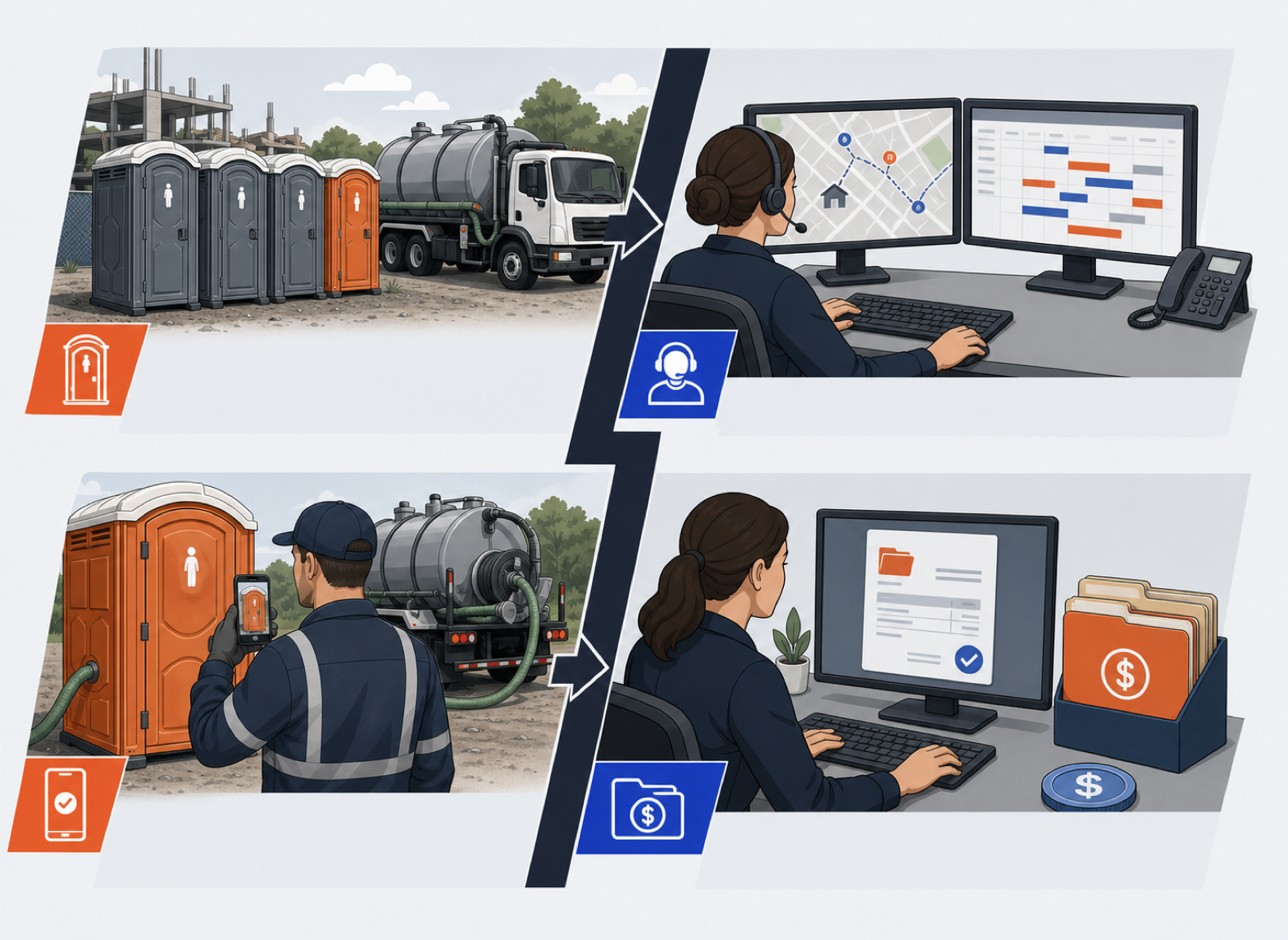
A portable sanitation dispatcher rarely gets a clean day. A contractor adds four units after the billing cycle has started. One route needs to move because a driver called out. A customer wants proof that every unit was serviced. The office needs the extra units billed correctly without sending a second set of invoices.
That is the comparison that matters. CRO and ServiceCore overlap on the headline features, so a checklist of green boxes will not settle the decision. This guide compares the same operating test on both sides and shows where each platform is most likely to fit.
Can the office keep the customer, service location, every deployed unit, recurring schedule, contacts, pricing, and service history together without creating duplicate records?
Can dispatch plan recurring routes, add new work, optimize the day, and move a job after trucks are already out without rebuilding everything?
Can a driver see the route, get directions, document a partial or failed service, add photos or charges, capture a signature, and close the job from a phone?
Can the system handle batch billing, recurring charges, mid-cycle changes, payments, aging, statements, and follow-up without making the office enter the work twice?
How will data move, who configures the account, how does training work, what happens at go live, and what help is available after the implementation team steps away?
Does the software fit the work you run today, the work you may add next, and the full truck and office team you expect to have three years from now?
This table uses capabilities stated on each vendor's current public pages. A green Yes means the vendor publicly names the capability. A yellow Confirm means the broader workflow is present, but the exact edge case still belongs in the demo.
| Operating test |  CRO CRO |
 ServiceCore ServiceCore |
|---|---|---|
| Purpose built industry scope | YesPortable sanitation, roll-off and dumpster, septic and liquid waste, solid waste, and scrap and metal recycling | YesPortable rental, septic, and dumpster rental businesses |
| Route planning and day-of changes | YesStatic and dynamic routing with drag-and-drop dispatch | YesAutomatic optimization, schedule suggestions, and drag-and-drop changes |
| Driver proof of service | YesPhotos, notes, signatures, service status, and billable field items | YesPhotos, attachments, signatures, added charges, and partial or failed job status |
| Inventory and unit location | YesPer-unit records, mapped placement, availability, and duration reporting | YesUnit location, availability calendar, product lines, and map placement |
| Billing and receivables | YesField-to-invoice billing, payments, aging filters, batch statements, and Collections Baskets | YesBatch invoicing, customizable rental pricing, payments, balances, and aging reports |
| Multiple units at one service location | YesConfirmed in a current product demonstration record | ConfirmPublic pages confirm units and sites, but not this exact multi-unit site workflow |
| Pricing structure | Published modelBase platform fee plus per truck pricing, with unlimited office users | Quote after demoTwo plans named, Start and Pro; the figure comes after a personalized demo, billed monthly on an annual contract |
Do not let one vendor show a polished route screen while the other walks through billing. Give both teams the same scenario and ask them to complete it from start to finish.
This is where product fit becomes visible. The winning system is the one your dispatcher, driver, and billing team can all follow without a workaround living in somebody's memory.
Best for
Waste and site service operators that want one operating system across several service lines or deep field-to-invoice control.
Key strength
One customer, dispatch, field, billing, and collections record across five verticals.
Platform 1
CRO is built for route-based waste and site service businesses. Its customer center, dispatch board, driver app, unit records, billing, payments, and collections tools are designed to carry the same job from the first call through collected cash.
Where it wins
Where to look closely
CRO is designed to become the operating core. A small single-line operation should make sure the configuration, implementation plan, and breadth match what the team can absorb now, not only what the business might need later.
Verdict: The stronger fit when connected field-to-invoice work, collections, and multi-service growth matter more than staying inside a narrower portable, septic, and dumpster footprint.
Best for
Portable sanitation, septic, and dumpster operators that want a focused platform and a clearly published onboarding process.
Key strength
Route optimization, inventory, billing, and field tools built around its three named industries.
Platform 2
ServiceCore is purpose built for portable rental, septic, and dumpster rental businesses. Its public product pages connect customer and job management, route planning, driver work, unit inventory, billing, reports, payments, and customer self-service.
Where it wins
Where to look closely
Operators running several service lines should compare ServiceCore's three named industries with CRO's five. They should also ask ServiceCore to demonstrate several units with separate placement points at one site and a mid-cycle unit addition, because its current public pages do not document that exact edge case.
Verdict: A credible choice for a portable sanitation, septic, or dumpster operator that values a focused industry footprint, route optimization, and a well-defined implementation path.
Both products publish customer, site, job, and unit management. ServiceCore says the office can keep customer sites, contacts, pricing, jobs, rentals, and unit availability together. CRO adds per-unit records, mapped placement, duration reporting, and support for multiple units at one service location.
A recent portable sanitation evaluation turned on this exact detail. The operator did not need another inventory screen. He needed several units at one location to remain easy to map, service, and bill. That field insight does not prove a limitation in ServiceCore's current product, so the fair test is to build the site in both demos and count the steps.
CRO publishes static and dynamic routing, drag-and-drop dispatch, recurring work, same-day changes, and destination-aware routing for waste and site service work. ServiceCore publishes a strong routing story: map and list views, filters, driver capacity, closest-location suggestions, measured drive and service time, drag-and-drop changes, and automatic optimization.
If route sequence is the main pain, make both vendors optimize the same day and then interrupt it. Add an emergency pickup, move a stop to another driver, and compare what the dispatcher must rebuild. The cleanest first plan is less important than how the system handles the day after the plan breaks.
Both vendors cover the core driver record. CRO names route details, photos, notes, signatures, in-app communication, failed-job documentation, and field items that carry into billing. ServiceCore names route previews, directions, service time, partial or failed jobs, notes, photos, extra charges, and signatures.
Put a real phone in the demo. Ask a driver or field supervisor to complete the test job without coaching. An app drivers will actually use should make the next action obvious, keep typing low, and leave dispatch with enough proof to answer a customer without calling the driver back.
CRO connects field completion to invoicing, supports recurring and advance billing, and adds a collections workflow with aging buckets, batch statements, account notes, and Collections Baskets. ServiceCore publishes batch invoicing, customizable billing cycles and rental rates, surcharges, email or print delivery, payments, balances, aging reports, and accounting-system sync.
The mid-cycle test matters here. Add four units halfway through the month, complete one service with an extra charge, and ask each system to show the invoice. Then move that balance into collections. The office should be able to explain every line without reconstructing the job from messages and paper.
CRO uses a base platform fee plus per truck pricing, with unlimited office users and no per user or per seat fees. ServiceCore names two plans, Start and Pro, and gives the figure after a personalized demo. It states that it bills monthly under an annual contract, and it charges separately for digital marketing. Neither vendor publishes one current dollar amount that will describe every operation, so the unit each vendor charges by is the first thing to pin down.
Build the quote around the same operating model. Include every active truck, dispatcher, billing user, manager, branch, service line, payment tool, accounting connection, data migration task, and implementation charge. Then price the fleet you expect to run in three years. Two per truck models can still produce very different totals once the base platform, implementation, optional packages, processing, and growth assumptions are included.
The most honest answer is simple: choose the platform that completes your real workflow with the least re-entry and the clearest ownership. A vendor should be able to show that in the software, not only describe it in a slide.
Give each item a score from 1 to 5, using the same people and the same test data in both demos.
| Test | What a 5 looks like | Your score |
|---|---|---|
| Site and unit setup | One customer, one site, several units, clear placement, history, pricing, and contacts with no duplicate records | 1 to 5 |
| Day-of dispatch | A route change and emergency job are handled without rebuilding the whole day | 1 to 5 |
| Driver completion | The driver records proof, an exception, and a billable extra on a real phone without coaching | 1 to 5 |
| Invoice accuracy | The invoice reflects recurring service, mid-cycle units, and field charges without office re-entry | 1 to 5 |
| Collections follow-up | The office finds the balance, sends the statement, and logs the next action from one clear workflow | 1 to 5 |
| Implementation confidence | Data ownership, configuration, training, go live, support, and total cost are written down with named owners | 1 to 5 |
Ready to run this workflow test against CRO with your own routes, units, and billing rules? Schedule a RapidWorks demo.
ServiceCore is purpose built for portable rental, septic, and dumpster rental businesses. CRO is purpose built for waste and site service operators across five verticals: portable sanitation, roll-off and dumpster, septic and liquid waste, solid waste, and scrap and metal recycling. Both cover core office and field work, but CRO has the broader named service-line footprint.
Yes. ServiceCore publishes automatic route optimization, schedule suggestions, map and list views, drive and service time, and drag-and-drop changes. CRO publishes static and dynamic routing, recurring routes, drag-and-drop dispatch, same-day changes, and destination-aware routing for waste and site service operations.
Yes. ServiceCore's app covers route details, directions, service time, partial or failed jobs, photos, added charges, and signatures. CRO's driver app covers route and job details, proof of service, photos, notes, signatures, failed-job documentation, in-app communication, and billable field items that can carry into invoicing.
CRO uses a base platform fee plus per truck pricing, with unlimited office users and no per user or per seat fees. ServiceCore publishes two plan names, Start and Pro, and gives the figure after a personalized demo. It states that it bills monthly on an annual contract. Ask both vendors for a written quote using the same trucks, users, service lines, implementation work, and three-year growth plan, and ask ServiceCore how it counts users.
ServiceCore says setup typically takes 6 to 12 weeks depending on business size. Its published six step process covers kickoff, data import, account configuration, tailored training, go live, and support. Ask CRO to provide the same written implementation plan so timing, data ownership, training, and responsibilities can be compared directly.
CRO is the stronger fit when one company needs to run portable sanitation beside roll-off and dumpster, septic and liquid waste, solid waste, or scrap and metal recycling in one system. ServiceCore is a credible fit when the operation is centered on its three named industries and its routing, inventory, field, billing, and onboarding workflows perform better in the buyer's real test.
